Thursday, 8 September 2011

Sony to release tablet computer this month

The foldable Sony tablet "P" is displayed after its presentation at the 51st edition of the "IFA" trade fair in Berlin. Sony's first tablet computer will hit the Japanese market on September 17 as the company looks to take on Apple's popular iPad.


The Sony Tablet will be powered by Google's Android software, allowing users to download content such as books, movies and games.
The Sony Tablet "S" series with a 9.4-inch (23.8 centimetre) touchscreen display is expected to have a price tag of 45,000 yen ($580) for a 16-gigabyte data storage model and 53,000 yen for the 32-gigabyte version.
The product will also become available in US and European markets later this month, with a price tag of $499 and 479 euros for the 16-gigabyte model.
Competitors have rushed to cash in on soaring demand for tablets since the was released in April last year, but Sony's devices will arrive well behind those of its rivals.
The devices will have access to Sony's cloud of online content such as movies, music, , PlayStation games and other entertainment.
Sony has focused more on pushing its content such as games and music through  including , smartphones and tablet computers.
It will release the dual-screened "P" series with a folding design, incorporating two 5.5-inch screens in Japan between October and November. The series will be launched in November in Europe and sometime later this year in the United States.
"Sony aims to grab the No. 1 share of the growing Android-based  (in Japan) in fiscal 2012 (ending March 2013)," Kyodo News quoted Akihiro Matsubara, corporate vice president of Sony Marketing Inc, as saying.
Sony shares rose 1.98 percent to 1,698 yen in Tokyo trade on Thursday.


Wednesday, 7 September 2011

Buffalo Adds Windows Storage for SMBs While Staying True to Linux Users


Buffalo Technology -- the world market leader in consumer NAS (network-attached storage) -- plans to continue producing low-cost, high-powered Linux storage devices for home offices. Yet the release of Buffalo's new TeraStation Pro line-up, the company's first product family for both Linux and Microsoft Windows, signals a further expansion into the SMB space, said Brian Verenkoff, director of marketing and business development.
Offered in both rack and desktop pedestal configurations, the new Linux-based TeraStation Pro and Windows Storage Server-enabled TeraStation Pro WSS models each feature Intel dual-core CPUs with 2GB of RAM; dual Gigabit Enternet ports; high-speed USB 3.0 connectivity; and built-in RAID (Redundant Array of Inexpensive Disks).
Also front and center are distinctive, platfom-specific features for the embedded Linux and Windows flavors of TeraStation Pro, he noted, in a meeting with DesktopReview.com on a New York City press tour.
"We've always focused on providing the same capabilities that users would get from a Dell or an HP, but at much lower pricing," he added.
In a study issued in January, industry analyst firm In-Stat named Buffalo the world market leader in consumer NAS devices for the sixth consecutive year. Also according to In-Stat, the global consumer NAS market leaped 30.3 percent in unit shipments in 2010.
A subsidiary of Japanese-based Melco Holdings, Buffalo first entered the NAS market around seven years ago. Its name is derived from one of the company's first products, a printer buffer heavily promoted at Comdex trade shows a number of years ago. Buffalo's US headquarters is located in Austin, TX.
First Linux -- and now Windows, too
With new Terastation Pro models running on the company's traditional embedded Linux platform, Buffalo continues to target its long-time market of SOHO and "prosumer" enthusiasts, Verenkoff said.
In contrast, the new WSS line-up represents another step on an upstream journey Buffalo embarked on with the rollout of its first rackmount servers about four years ago, Buffalo, he said, now wants to stretch toward the medium-sized enterprise market, where profit margins are relatively high, even during the current economic downturn.
In the CES 2012 time frame, Buffalo expects to announce a new product eyed as pushing the company further in that direction, Verenkoff said, although he wouldn't specify which operating system (OS) the future product will use.
As for the already announced TeraStation Pro family, it comes in 1U rackmount and two-, four-, and six-bay pedestal configurations. A roomier eight-bay model is available for Linux, but not for the Windows side of the house. Capacity tops out at 12TB for the WSS models, and at 24TB on the Linux-enabled NAS boxes.
List pricing ranges from $499 to $3,499, and street pricing is even less, according to Verenkoff. The windows devices fold in Windows licensing fees. "Pricing is low cost for the Windows products, and lower for the Linux products," he maintained.
TeraStation Pro WSS: iSCSI Target and SIS Deduplication
Buffalo's new TeraStation Pro WSS storage hardware is designed to support SMBs' existing Windows environments. Powered by Microsoft's Windows Storage Server 2008 R2, an OS aimed at optimized file sharing, the WSS devices run Windows Server OS and are configurable through the Windows Shell. In contrast, Buffalo's Linux NAS devices are configured via Web browsers.
Other features of the Windows storage boxes include native support for NTFS (New Technology File System) and Microsoft's Active Directory; Windows search; full Windows print serving; DFS (Distributed File System) replication; IIS (Internet Information Services); Windows Server backup; iSCSI (Internet Small Computer System Interface) Target and iSCSI initiator; RAID 0, 1, 5, 10 + Dynamic Disk; and -- on rackmount models only -- SIS (Single-Instance Storage) Deduplication.  
iSCSI Target, he noted, uses WSS storage as block-level storage for other servers, for purposes that include VM (virtual machine) storage through Hyper-V and VMware. Through the use of Dynamic Disk, multiple iSCSI targets can be combined into a single RAID 5 array.
For its part, SIS Deduplication is designed to reduce capcity utilization by removing duplicate files. Verenkoff estimated an average deduplication ratio for standard Windows backups of around 22:1. Data reduction from SIS Deduplication tends to be highest for engineering data archives and user home directories, and lowest for Web hosting data and for images, videos, and MP3 files, he said.
"Deduplicated data is placed into a common store and links are placed in the file system," he explained. "When users access their files, they access the common store file. If users modify the file, SIS automatically branches off a new file to reflect the changes."
The Linux and Windows NAS devices both support Windows Networking, NFS (Network File System), and FTP (File Transfer Protocol). Connections are unlimited for all Linux devices and for the rackmount Windows models. The Windows pedestal products support a maximum of 50 simultaneous connections.
Buffalo's Linux boxes: Failover, Google-like search, remote access from smartphones
Features specific to the Linux NAS boxes include built-in Web wizards; NTFS read and write permissions; DLNA (Digital Living Network Alliance) Media Server; Rsync-based Replication; Simple USB Backup Utility; Basic Print Server (print only); a Google-like Web-based search tool; and remote access from mobile devices through Apple iOS and Android OS apps.
In addition, five of the new Linux models also feature failover for storage system redundancy. "When writing a file to the TeraStation, the main TeraStation automatically copies it to the backup TeraStation," according to Verenkoff.
"When the main TeraStation becomes inaccessible, the backup TeraStation automatically assumes the main's role. [PC] clients can continuously access data without noticing any TeraStation failure," he contended.
The new Linux storage servers also support RAID 1, 5, 10, 6, 50, 51, 60 and 61, with RAID expansion.

Friday, 24 June 2011

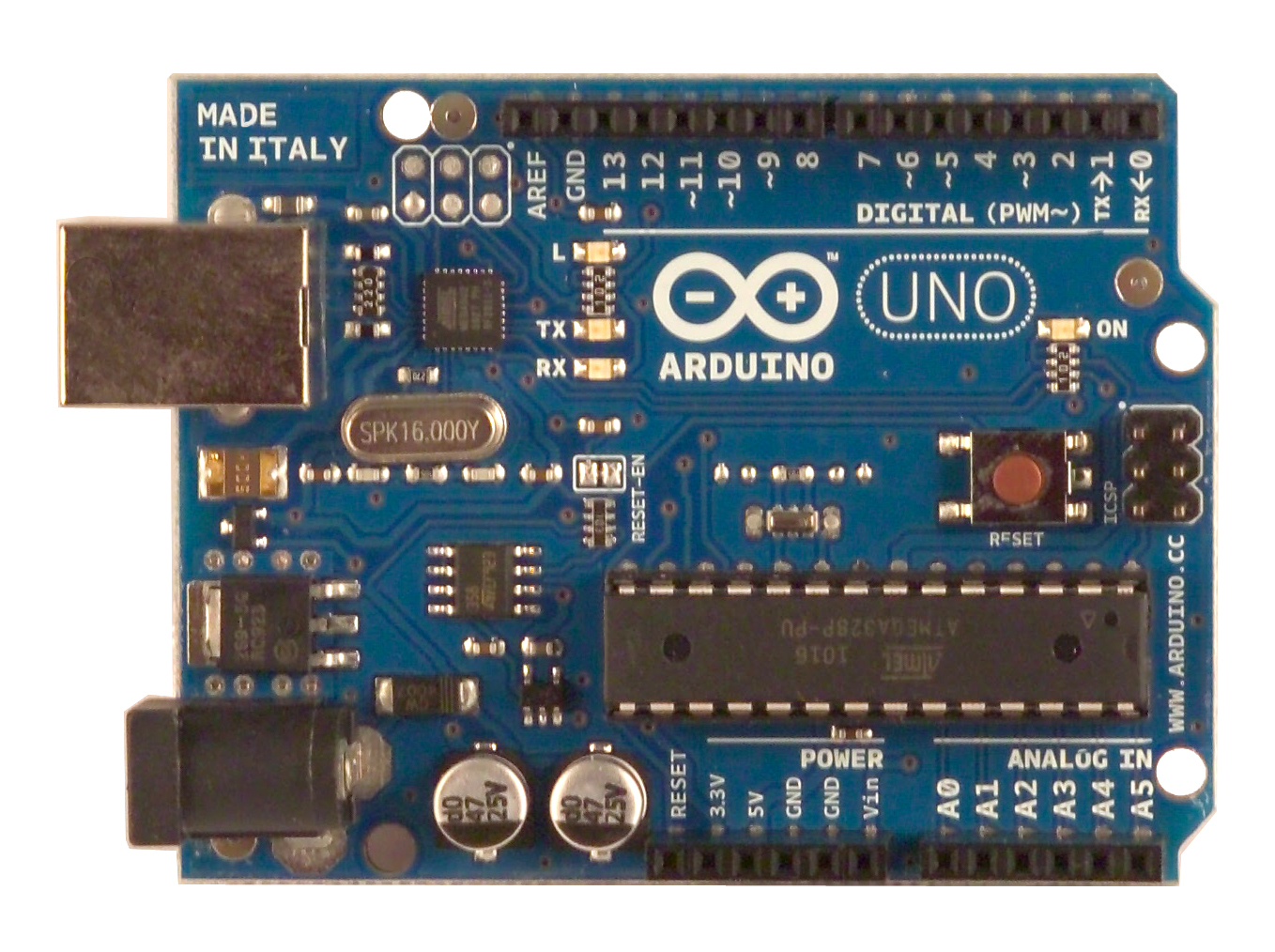
Arduino Uno (ATMEGA MICROCONTROLLER)

Overview


The Arduino Uno is a microcontroller board based on the ATmega328 (datasheet). It has 14 digital input/output pins (of which 6 can be used as PWM outputs), 6 analog inputs, a 16 MHz crystal oscillator, a USB connection, a power jack, an ICSP header, and a reset button. It contains everything needed to support the microcontroller; simply connect it to a computer with a USB cable or power it with a AC-to-DC adapter or battery to get started.
The Uno differs from all preceding boards in that it does not use the FTDI USB-to-serial driver chip. Instead, it features the Atmega8U2 programmed as a USB-to-serial converter.
"Uno" means one in Italian and is named to mark the upcoming release of Arduino 1.0. The Uno and version 1.0 will be the reference versions of Arduino, moving forward. The Uno is the latest in a series of USB Arduino boards, and the reference model for the Arduino platform; for a comparison with previous versions, see the index of Arduino boards.

Summary

MicrocontrollerATmega328
Operating Voltage5V
Input Voltage (recommended)7-12V
Input Voltage (limits)6-20V
Digital I/O Pins14 (of which 6 provide PWM output)
Analog Input Pins6
DC Current per I/O Pin40 mA
DC Current for 3.3V Pin50 mA
Flash Memory32 KB (ATmega328) of which 0.5 KB used by bootloader
SRAM2 KB (ATmega328)
EEPROM1 KB (ATmega328)
Clock Speed16 MHz

Schematic & Reference Design

EAGLE files (original): arduino-uno-reference-design.zip
Schematic (original): arduino-uno-schematic.pdf

Power

The Arduino Uno can be powered via the USB connection or with an external power supply. The power source is selected automatically.
External (non-USB) power can come either from an AC-to-DC adapter (wall-wart) or battery. The adapter can be connected by plugging a 2.1mm center-positive plug into the board's power jack. Leads from a battery can be inserted in the Gnd and Vin pin headers of the POWER connector.
The board can operate on an external supply of 6 to 20 volts. If supplied with less than 7V, however, the 5V pin may supply less than five volts and the board may be unstable. If using more than 12V, the voltage regulator may overheat and damage the board. The recommended range is 7 to 12 volts.
The power pins are as follows:
  • VIN. The input voltage to the Arduino board when it's using an external power source (as opposed to 5 volts from the USB connection or other regulated power source). You can supply voltage through this pin, or, if supplying voltage via the power jack, access it through this pin.
  • 5V. The regulated power supply used to power the microcontroller and other components on the board. This can come either from VIN via an on-board regulator, or be supplied by USB or another regulated 5V supply.
  • 3V3. A 3.3 volt supply generated by the on-board regulator. Maximum current draw is 50 mA.
  • GND. Ground pins.

Memory

The ATmega328 has 32 KB (with 0.5 KB used for the bootloader). It also has 2 KB of SRAM and 1 KB of EEPROM (which can be read and written with the EEPROM library).

Input and Output

Each of the 14 digital pins on the Uno can be used as an input or output, using pinMode()digitalWrite(), and digitalRead()functions. They operate at 5 volts. Each pin can provide or receive a maximum of 40 mA and has an internal pull-up resistor (disconnected by default) of 20-50 kOhms. In addition, some pins have specialized functions:
  • Serial: 0 (RX) and 1 (TX). Used to receive (RX) and transmit (TX) TTL serial data. These pins are connected to the corresponding pins of the ATmega8U2 USB-to-TTL Serial chip.
  • External Interrupts: 2 and 3. These pins can be configured to trigger an interrupt on a low value, a rising or falling edge, or a change in value. See the attachInterrupt() function for details.
  • PWM: 3, 5, 6, 9, 10, and 11. Provide 8-bit PWM output with the analogWrite() function.
  • SPI: 10 (SS), 11 (MOSI), 12 (MISO), 13 (SCK). These pins support SPI communication using the SPI library.
  • LED: 13. There is a built-in LED connected to digital pin 13. When the pin is HIGH value, the LED is on, when the pin is LOW, it's off.
The Uno has 6 analog inputs, labeled A0 through A5, each of which provide 10 bits of resolution (i.e. 1024 different values). By default they measure from ground to 5 volts, though is it possible to change the upper end of their range using the AREF pin and the analogReference() function. Additionally, some pins have specialized functionality:
  • I2C: A4 (SDA) and A5 (SCL). Support I2C (TWI) communication using the Wire library.
There are a couple of other pins on the board:
  • AREF. Reference voltage (0 to 5V only) for the analog inputs. Used with analogReference().
  • Reset. Bring this line LOW to reset the microcontroller. Typically used to add a reset button to shields which block the one on the board.

Communication

The Arduino Uno has a number of facilities for communicating with a computer, another Arduino, or other microcontrollers. The ATmega328 provides UART TTL (5V) serial communication, which is available on digital pins 0 (RX) and 1 (TX). An ATmega8U2 on the board channels this serial communication over USB and appears as a virtual com port to software on the computer. The '8U2 firmware uses the standard USB COM drivers, and no external driver is needed. However, on Windows, a .inf file is required. The Arduino software includes a serial monitor which allows simple textual data to be sent to and from the Arduino board. The RX and TX LEDs on the board will flash when data is being transmitted via the USB-to-serial chip and USB connection to the computer (but not for serial communication on pins 0 and 1).
SoftwareSerial library allows for serial communication on any of the Uno's digital pins.
The ATmega328 also supports I2C (TWI) and SPI communication. The Arduino software includes a Wire library to simplify use of the I2C bus; see the documentation for details. For SPI communication, use the SPI library.

Programming

The Arduino Uno can be programmed with the Arduino software (download). Select "Arduino Uno from the Tools > Board menu (according to the microcontroller on your board). For details, see the reference and tutorials.
The ATmega328 on the Arduino Uno comes preburned with a bootloader that allows you to upload new code to it without the use of an external hardware programmer. It communicates using the original STK500 protocol (referenceC header files).
You can also bypass the bootloader and program the microcontroller through the ICSP (In-Circuit Serial Programming) header; see these instructions for details.
The ATmega8U2 firmware source code is available . The ATmega8U2 is loaded with a DFU bootloader, which can be activated by connecting the solder jumper on the back of the board (near the map of Italy) and then resetting the 8U2. You can then use Atmel's FLIP software (Windows) or the DFU programmer (Mac OS X and Linux) to load a new firmware. Or you can use the ISP header with an external programmer (overwriting the DFU bootloader). See this user-contributed tutorial for more information.

Automatic (Software) Reset

Rather than requiring a physical press of the reset button before an upload, the Arduino Uno is designed in a way that allows it to be reset by software running on a connected computer. One of the hardware flow control lines (DTR) of theATmega8U2 is connected to the reset line of the ATmega328 via a 100 nanofarad capacitor. When this line is asserted (taken low), the reset line drops long enough to reset the chip. The Arduino software uses this capability to allow you to upload code by simply pressing the upload button in the Arduino environment. This means that the bootloader can have a shorter timeout, as the lowering of DTR can be well-coordinated with the start of the upload.
This setup has other implications. When the Uno is connected to either a computer running Mac OS X or Linux, it resets each time a connection is made to it from software (via USB). For the following half-second or so, the bootloader is running on the Uno. While it is programmed to ignore malformed data (i.e. anything besides an upload of new code), it will intercept the first few bytes of data sent to the board after a connection is opened. If a sketch running on the board receives one-time configuration or other data when it first starts, make sure that the software with which it communicates waits a second after opening the connection and before sending this data.
The Uno contains a trace that can be cut to disable the auto-reset. The pads on either side of the trace can be soldered together to re-enable it. It's labeled "RESET-EN". You may also be able to disable the auto-reset by connecting a 110 ohm resistor from 5V to the reset line; see this forum thread for details.

USB Overcurrent Protection

The Arduino Uno has a resettable polyfuse that protects your computer's USB ports from shorts and overcurrent. Although most computers provide their own internal protection, the fuse provides an extra layer of protection. If more than 500 mA is applied to the USB port, the fuse will automatically break the connection until the short or overload is removed.

Physical Characteristics

The maximum length and width of the Uno PCB are 2.7 and 2.1 inches respectively, with the USB connector and power jack extending beyond the former dimension. Four screw holes allow the board to be attached to a surface or case. Note that the distance between digital pins 7 and 8 is 160 mil (0.16"), not an even multiple of the 100 mil spacing of the other pins. 

Wednesday, 22 June 2011

Dan Nocera: Personalized Energy


PIEZOELECTRIC ENERGY HARVESTER FROM VIBRATIONS - A MODULE FOR INDUSTRIAL APPLICATION


          This project is just an example of Vibrational Energy Harvesting. We can give whatever the vibrational source available as input. Also, here we are storing the obtained power it can be used for any purpose. If you want to eliminate battery then no problem just with the help of proper power conditioning circuit you can directly connect the obtained power to load. But make sure the continuous source of vibration before eliminating battery.

THIS IS THE BLOCK DIAGRAM FOR THE PIEZOELECTRIC ENERGY HARVESTER
FROM VIBRATIONS

THIS IS THE SET UP FOR UTILIZATION OF HARVESTED POWER

APPLICATION OF VIBRATIONAL ENERGY FROM ANY
VIBRATING SOURCE


AFTER THE APPLICATION OF VIBRATION THE INDICATOR GLOWS
INDICATING THE POWER GENERATED


NOW THE GENERATED POWER IS STORED IN BATTERY AFTER PROPERLY
CONVERTING IT INTO DC 

POWER FROM BATTERY IS GIVEN TO LOW POWER SENSOR - THERMISTOR


THEN THE POWER FROM BATTERY IS SUPPLIED TO LDR


FINALLY SUPPLYING IRDA

PIN CONFIGURATION FOR IRDA
THE NEXT THREE PICTURES SHOWS THE CONTROLLING OF SENSORS 


INTERFACING CIRCUIT OR CONNECTION DIAGRAM


OUTPUT OF THE PROJECT

Friday, 17 June 2011

OLED


What is an OLED?

OLED (Organic Light Emitting Diodes) is a flat light emitting technology, made by placing a series of organic thin films between two conductors. When electrical current is applied, a bright light is emitted. OLEDs can be used to make displays and lighting. Because OLEDs emit light they do not require a backlight and so are thinner and more efficient than LCD displays(which do require a white backlight).
LG Display 31-inch OLED prototypeLG Display 31-inch OLED prototype
OLEDs are not just thin and efficient - they can also be made flexible (even rollable) and transparant.

OLED vs LCD

OLED displays have the following advantages over LCD displays:
  • Lower power consumption
  • Faster refresh rate and better contrast
  • Greater brightness - The screens are brighter, and have a fuller viewing angle
  • Exciting displays - new types of displays, that we do not have today, like ultra-thin, flexible or transparent displays
  • Better durability - OLEDs are very durable and can operate in a broader temperature range
  • Lighter weight - the screen can be made very thin, and can even be 'printed' on flexible surfaces

The future - flexible and transparent OLED displays

It turns out that because OLEDs are thin and simple - they can be used to create flexible and even transparent displays. This is pretty exciting as it opens up a whole world of possibilities:
  • Curved OLED displays, placed on non-flat surfaces
  • Wearable OLEDs
  • Transparent OLEDs embedded in windows
  • New designs for lamps
  • And many more we cannot even imagine today...Several companies are working towards this, and we already got some pretty exciting prototypes. Hopefully these kind of displays will become available within a few years!

How do OLEDs work?

An OLED is made by placing a series of organic thin films between two conductors. When electrical current is applied, a bright light is emitted.
OLEDs are organic because they are made from carbon and hydrogen. There's no connection to organic food or farming - although OLEDs are very efficient and do not contain any heavy metals - so it's a real green technology.

So what's organic about OLEDs?

Where can I find OLED displays today?

Today you can find small (up to 3 or 4 inch) organic displays in many types of devices - mobile phones, A/V players, car audio systems, Digital cameras and PDAs. Lot's of companies are placing OLEDs in their products - Sony, Samsung, Nokia, LG, Microsoft, and others.
The main attraction today is the small size, the low power consumption and the great brightness. Obviously OLEDs carry a price premium over LCDs, but companies are using these displays more and more.
Samsung Galaxy SSamsung Galaxy S

OLED disadvantages

OLEDs aren't perfect. First of all, these screens are currently expensive - although this should hopefully change in the future, as OLEDs has a potential to be even cheaper than LCDs because of their simple design.
OLEDs have limited lifetime (like any display, really), that was quite a problem a few years ago. But there has been constant progress, and today this is almost a non-issue.
OLEDs can also be PDS, because of their emmissive nature. But companies are working to make it better. Samsung is producing in-cell touch panel displays  and Nokia has inlcuded a polarized filter in their...

Can OLEDs produce white lighting?

One of the more exciting attributes of organic displays is the low power consumption, and the ability to operate as a light source. OLEDs can produce white light, and can provide the bulb of the future - low power and thin designs (and no heavy metals). As OLEDs will also be flexible and transparent, this technology can truly be the light of the future.
Transparent white OLEDs by PhilipsTransparent white OLEDs by Philips
A lot of companies (Samsung, LG, duc and others) are working towards OLED Lighting. OSRAM, Philips and Lumiotec already offer sample panels, but these are very expensive 'samples' and not real commercial products yet. Real products shold arrive by 2012, hopefully.